
A Second Look at Dia: Pleasantly Surprised
Not too long ago I wrote about why I couldn’t move from Arc to Dia. I was pretty harsh on Dia, and honestly, I thought that was going to be the end of my relationship with it. My Applications folder was going to be its final resting place.
Well, I was wrong.
I decided to give Dia another shot after seeing their release notes on tab groups, and I have to say, I’m pleasantly surprised. Actually, I’m more than pleasantly surprised; I’m genuinely optimistic about where this browser is headed.
What Changed?
Let me address the exact concerns I had in my original post, because Dia has either fixed them or I’ve come to appreciate their approach differently this time around.
Spaces (Profiles) Are Actually… Fine?
Look, I’m not going to pretend that Dia’s profiles work exactly like Arc’s spaces. They don’t. But here’s the thing; I was so focused on how they were different that I didn’t appreciate how they could work for me.
Yes, they still open in separate windows. Yes, the navigation isn’t quite as slick as Arc’s mouse gesture switching. But after using them for a bit, I’ve found they actually fit my workflow really well. The separation is more pronounced, which means when I’m in my work profile, I’m in my work profile. No accidental mixing of personal and work stuff. It’s grown on me.
The Sidebar Is Here!
This was a big one for me. When I first tried Dia, having tabs only at the top felt like a step backwards. I know they did add this feature in a while back but it was still not great. They still had no folders but that’s changed. What is great though is seeing how they have been listening and adding features in like the sidebar, thoughtfully. I can toggle between top and side tabs based on what I’m doing, but I find myself using the sidebar most of the time. It just feels right having that vertical real estate back on a large screen.
Tab Groups: Almost Better Than Folders
Here’s where Dia really surprised me. Their new tab groups feature (released in December) is… really good? Like, really, really good.
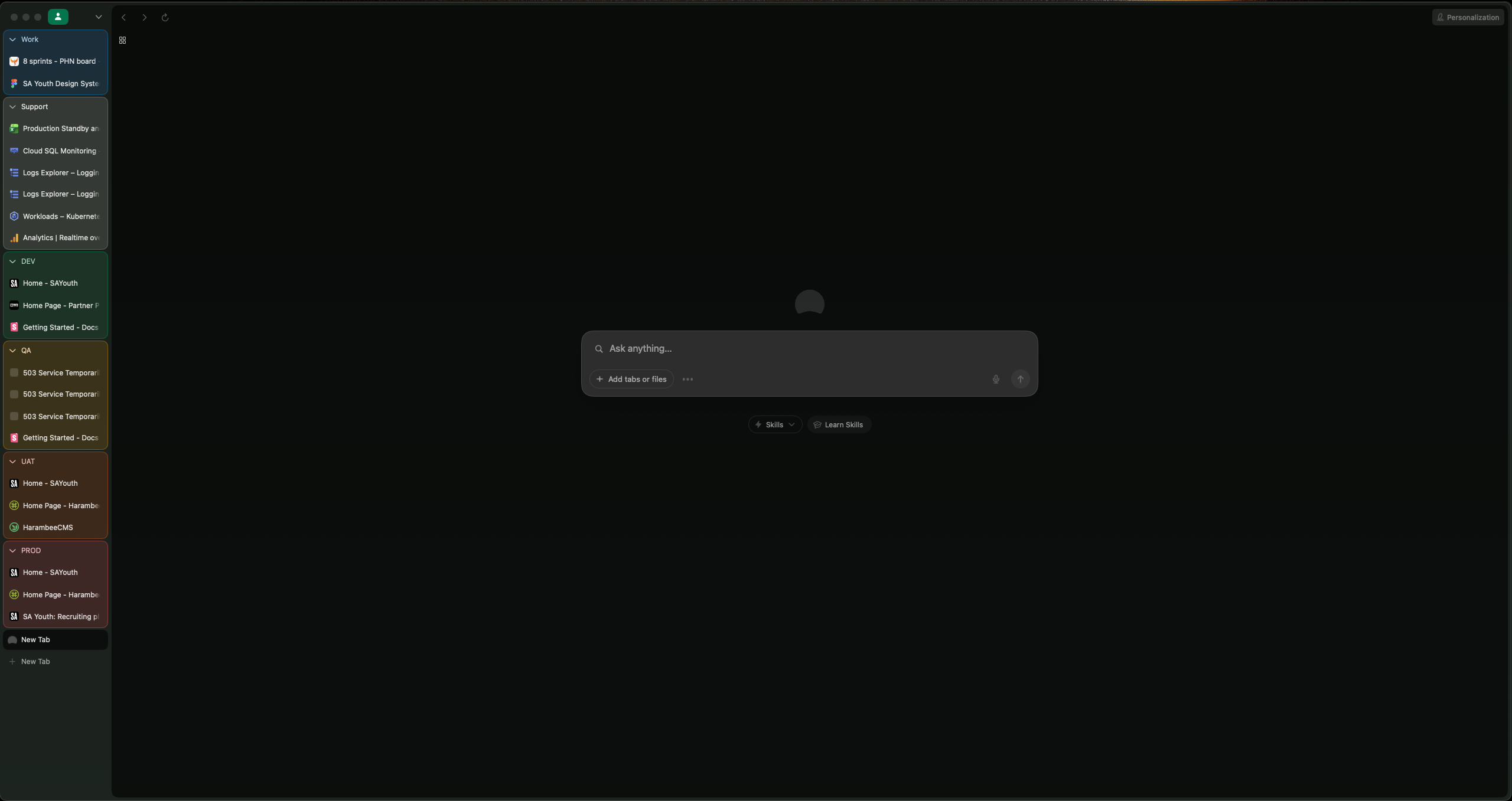
They’re colour-coded, which makes scanning through my work so much easier. I can organize by project, by client, by whatever makes sense at the time. They’re customisable and they stay put, so when I come back to my work, everything is exactly where I left it. The tab groups with the colour coding feels good and quick to recognise where I am and where I want to be.
There are still no live folders for things like GitHub Pull Requests but that is no deal breaker. Would be really great if they did add live folders back in but in a smart way that work with more providers or in some kind of plugin way that the community could contribute to. That would be pretty awesome.
Splits Are Here Too
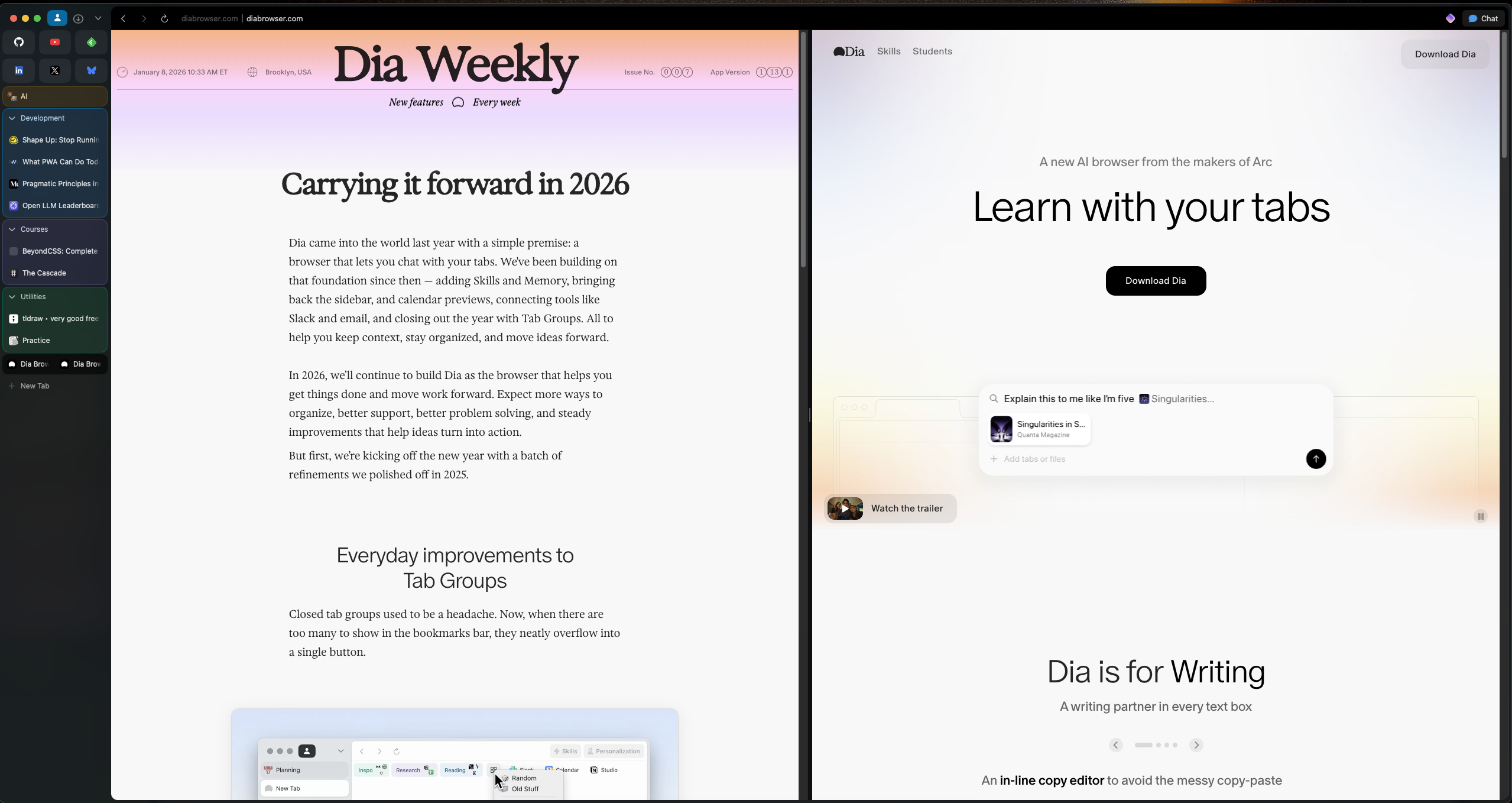
Tab splits. They’re here. I can put my Figma designs next to my working code. I can compare documents side by side. It works exactly like I need it to work. Check that box.
What I’m Excited About
The team is clearly listening to feedback. They’re not just building an Arc clone; they’re building something that learns from Arc’s strengths while going in their own direction. Looking at their release notes, they’re shipping meaningful updates.
The fact that they’ve added features like picture-in-picture for Google Meet, focus mode, and are constantly refining their AI capabilities shows they’re playing the long game. They’re not just trying to win back Arc users with feature parity; they’re building toward something bigger.
And that AI integration? I haven’t fully explored it yet, but I’m keen to see how valuable it becomes. The Skills feature, the ability to interact with tabs contextually, the Memory system. They’re genuinely trying to reimagine what a browser can do for you. If they can make these AI features truly useful rather than just flashy, Dia could end up being something really special.
The future of Dia looks genuinely bright. The Browser Company learned a lot with Arc, and now they’re applying those lessons with clear intention and impressive execution. I’m excited to be along for the ride.
The Verdict
I’m moving to Dia. Not begrudgingly. Not with reservations. I’m genuinely excited to use it.
Arc was incredible, and it’ll always be the browser that showed me what a browser could be. But Dia has answered my concerns, addressed my pain points, and shown me they’re committed to making a browser that works for real workflows.
See you on the other side.