
Herding Claudes: My Agentic Workflow, Five Months On
Back in February I wrote about how I use Claude Code in my daily workflow. The short version was: plan mode, small focused tasks, clear the context, review everything. That all still holds. What has changed is the scale. One Claude became a few Claudes running side by side, my laptop became a screen into a server, and a handful of small terminal tools now glue the whole loop together: git worktrees, herdr, hunk, and glow.
This post is a tour of that setup. As always, everything lives in my dotfiles if you want to poke at the actual configs.
It Started With Worktrees
The first problem you hit when you get comfortable with agentic coding is that one agent occupies your whole checkout. While Claude is busy on a feature branch, your working tree belongs to it. You can’t start a second task, you can’t even properly poke around, because you’d be editing files out from under an agent that is mid-change. So you sit there watching it work, which defeats the point.
Git worktrees fix this. A worktree is a second (or third, or fourth) checkout of the same repository in its own directory, on its own branch, sharing the same .git under the hood. Each Claude gets its own worktree, each worktree gets its own fresh branch, and nobody steps on anybody. My main checkout stays clean for me.
I bake this in as a global rule so I never have to think about it. My global CLAUDE.md opens with a working agreement that all code changes happen in a worktree, even one-line fixes:
## Git worktrees — always, for code work

When a task involves writing or modifying code in a git repository,
**work in a git worktree**, not the main checkout:

- Before making any code edits, call **EnterWorktree** (unless the
  session is already in a worktree). This applies to *all* code
  changes — features, refactors, and even one-line fixes.
Claude Code has worktree support built in these days, so the rule is mostly “use the thing that exists”. The one setting worth knowing about is worktree.baseRef in settings.json. I have it set to "fresh", which means every new worktree branches off the repo’s default branch as it exists on origin, not off whatever branch I happen to be sitting on. That one setting has saved me from a surprising number of “why does this PR contain my other PR” moments.
The payoff is that kicking off a task costs nothing. Bug report comes in while a feature is in flight? New session, new worktree, both run in parallel. If an experiment goes sideways I delete the worktree and it is like it never happened.
herdr Is Where They All Live
Once you have three or four sessions going, the next problem is keeping track of them. That is what herdr is for; it is a terminal-native agent multiplexer. Think tmux, but built around the idea that some of your panes have agents in them and you’d like to know what those agents are up to.
herdr gives you workspaces (one per project, roughly), tabs within a workspace, and panes within a tab. The bit I care about is the sidebar: it detects agents in your panes and shows each one’s status, so at a glance I can see which Claudes are working, which are blocked waiting for me, and which are done but not yet looked at.
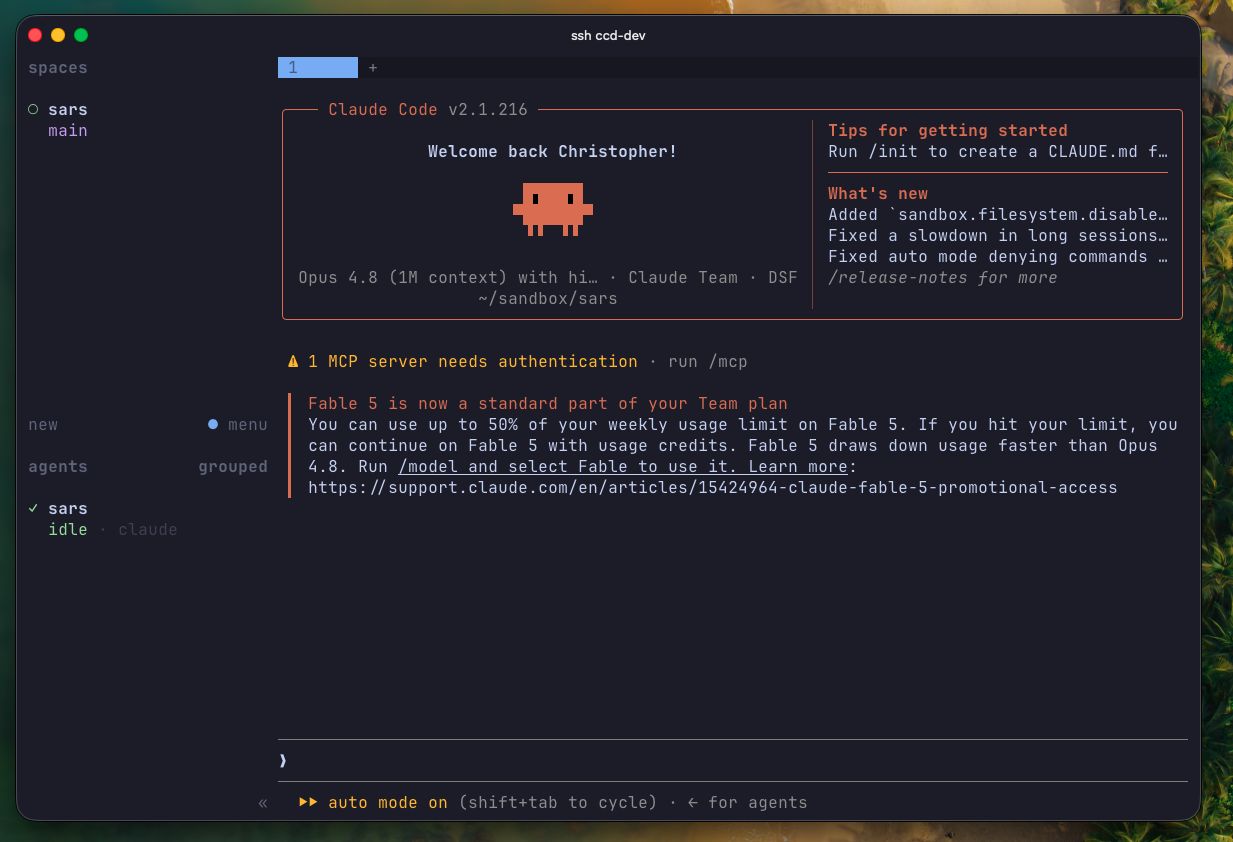
It fires a system toast when something needs my attention. My job has become answering the pane that is blocked, reviewing the pane that is done, and otherwise staying out of the way.
The genuinely fun part is that the agents can drive herdr themselves. There is a herdr CLI that talks to the running instance over a unix socket, and I ship a small skill in my dotfiles that teaches Claude how to use it. So a Claude session can split a pane next to itself, start the dev server there, run the tests in another pane, watch the output, and wait for a specific log line before carrying on. It can even spawn another agent if the task genuinely splits in two. The multiplexer stopped being a thing I arrange windows in and became part of the workflow itself.
The Review Loop: hunk and glow
In the February post I said you still need to review everything. I have not budged on that. What I have done is make the reviewing dramatically nicer, and this is where two Claude Code hooks come in.
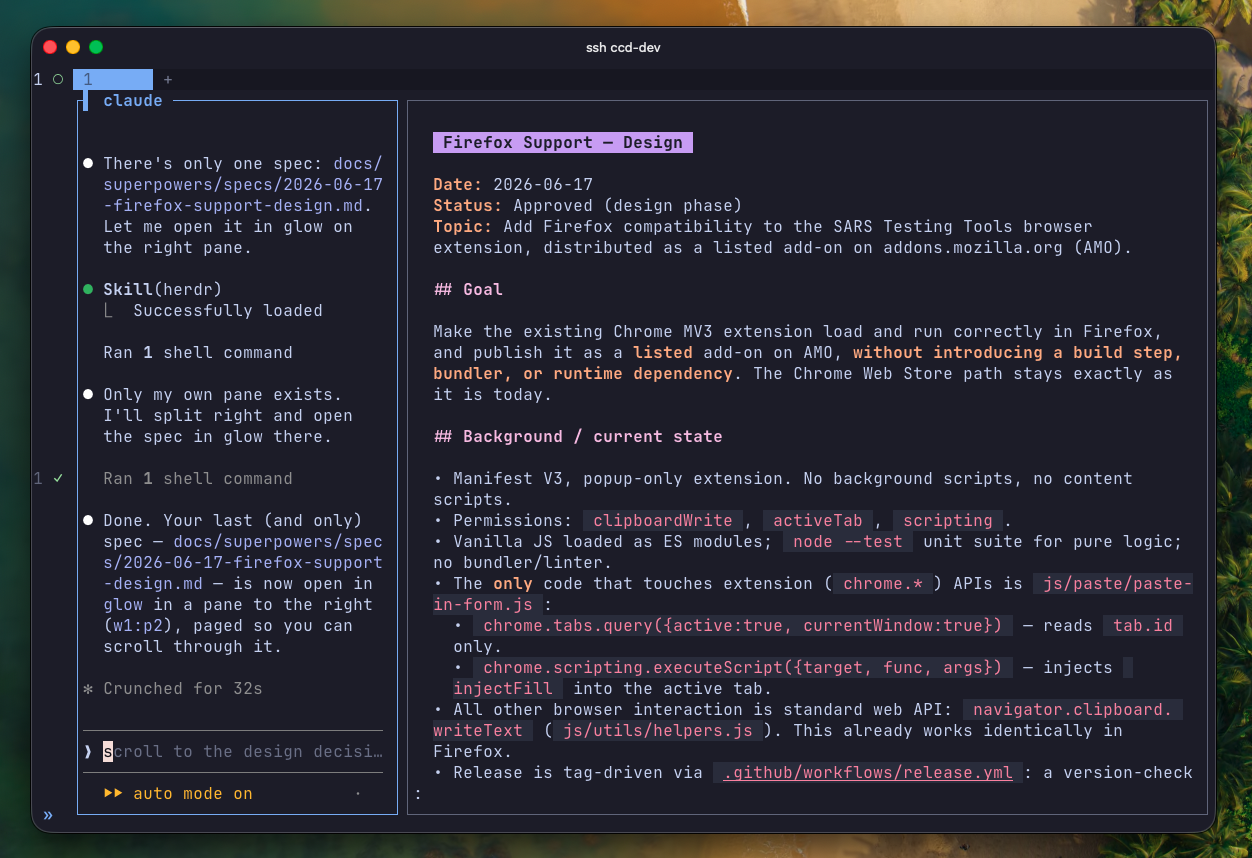
The first is a markdown preview. A PostToolUse hook watches for .md writes and opens (or refreshes) a glow pane in the right-hand column of the herdr tab. So when Claude writes a plan or a spec, I’m reading it rendered, not squinting at raw markdown in a scrollback buffer. The hook has a small denylist so it doesn’t fire for noise like CLAUDE.md edits or memory files; it only previews documents I actually need to read and sign off on.
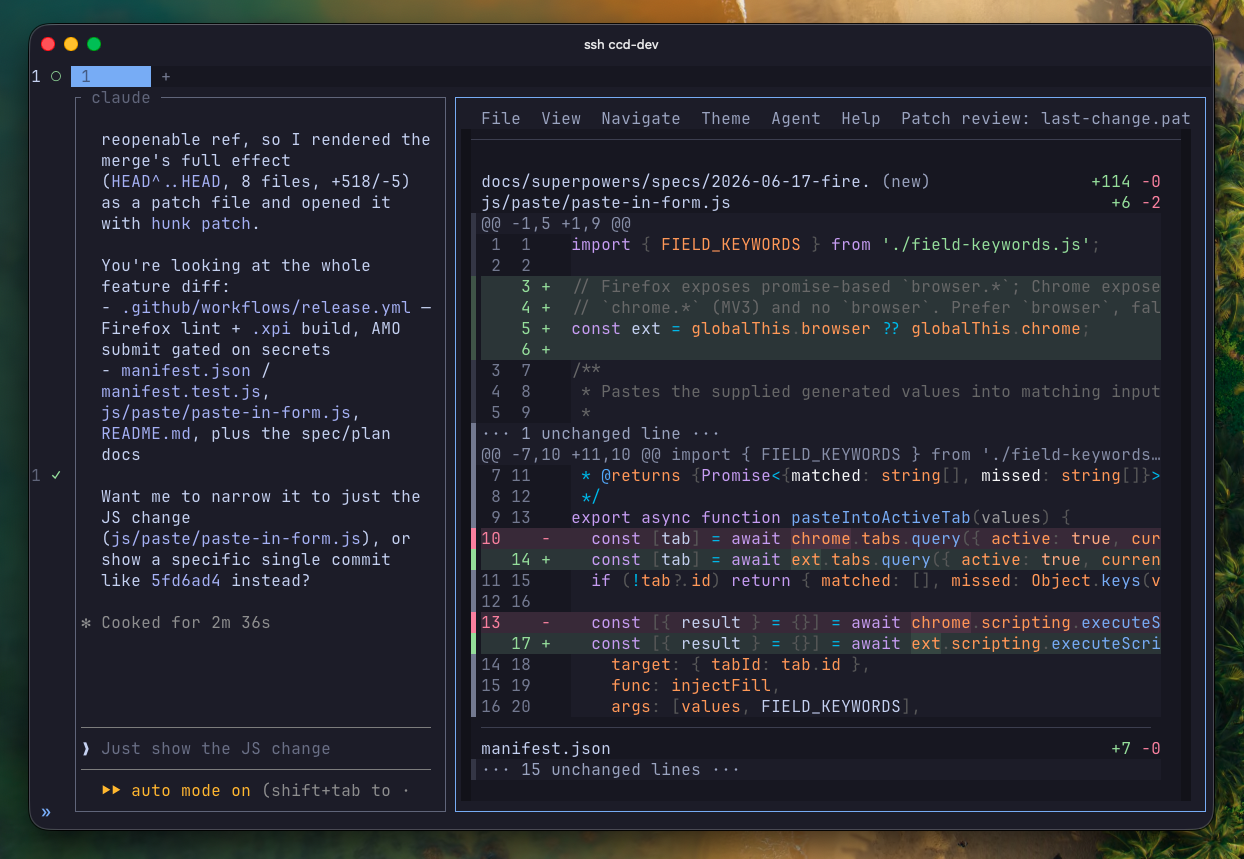
The second hook is the diff review. When Claude finishes a unit of work it runs a helper script that opens hunk in a side pane, pointed at the worktree it just changed, in watch mode. hunk is a terminal diff viewer, side-by-side, Catppuccin Mocha like everything else in my terminal, and it is also my git pager (core.pager = hunk pager in my gitconfig, filling the hole delta left when I switched).
Here is the part that changed how I review: the hunk pane is a live session that both of us can drive. I navigate the TUI like a normal human. Claude, meanwhile, uses hunk session commands to inspect the same diff, jump my view to a specific file and hunk, and leave inline comments on its own changes. So a review now goes: diff pane opens, Claude walks me through the change hunk by hunk, annotating the bits that deserve explanation, and I read actual rendered diffs instead of having the agent paraphrase what it did. “Show me, don’t tell me” as a workflow.
Doing All of This on a Server
The other change since February is where all this runs. My dotfiles now have a server profile: on an Ubuntu box, ./install.sh skips everything GUI and installs just the TUI stack, zsh, neovim, herdr, hunk, glow, lazygit, and friends. Combined with mosh and SSH connection multiplexing in my ssh config, my laptop is basically a screen.
The reason is simple: agents keep working when I disconnect. I can kick off a couple of tasks, close the laptop, and reconnect later to a sidebar full of done statuses waiting for review. A flaky connection doesn’t kill a half-finished refactor because nothing was running on my side of the wire in the first place. And because the whole workflow is terminal-native, the experience over SSH is identical to sitting at the machine. This is where betting on TUIs for everything quietly pays off.
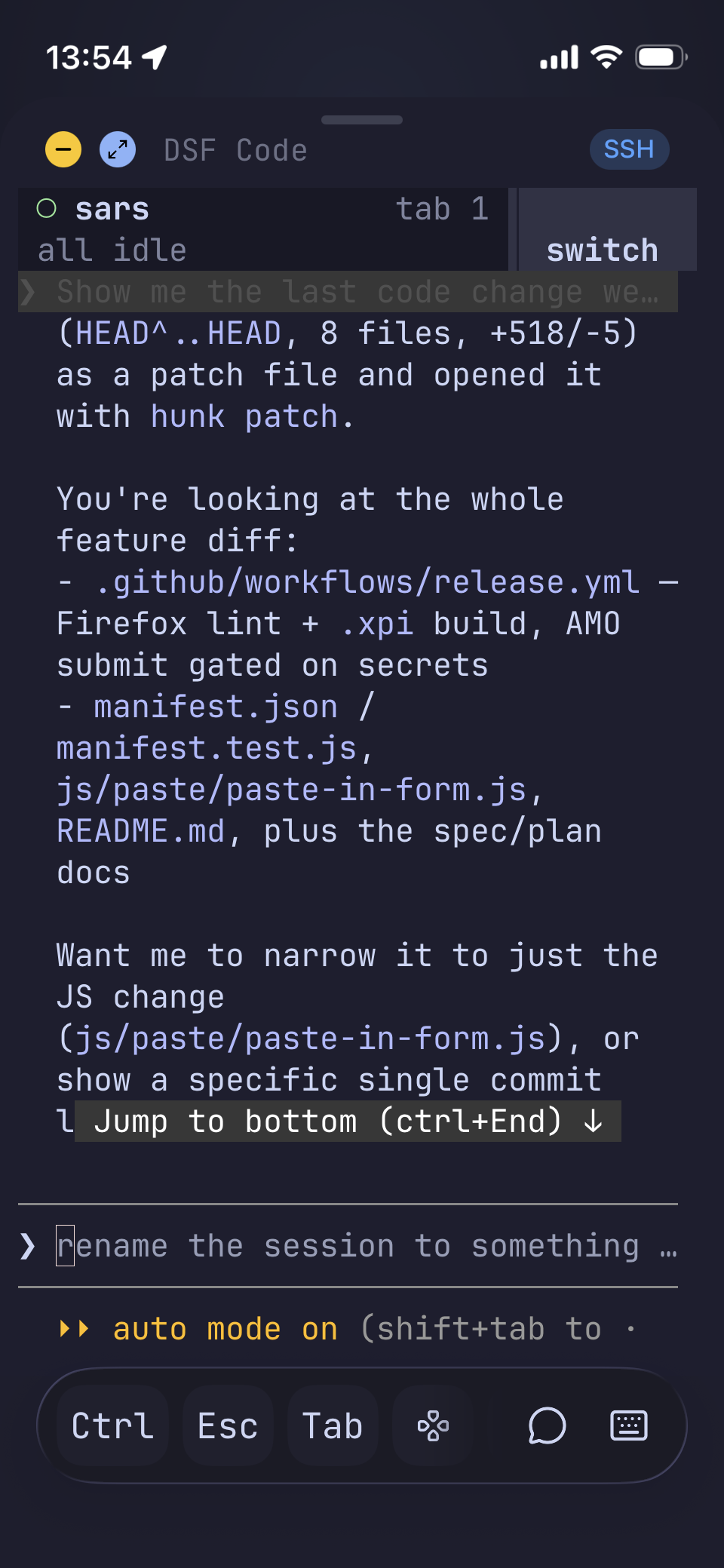
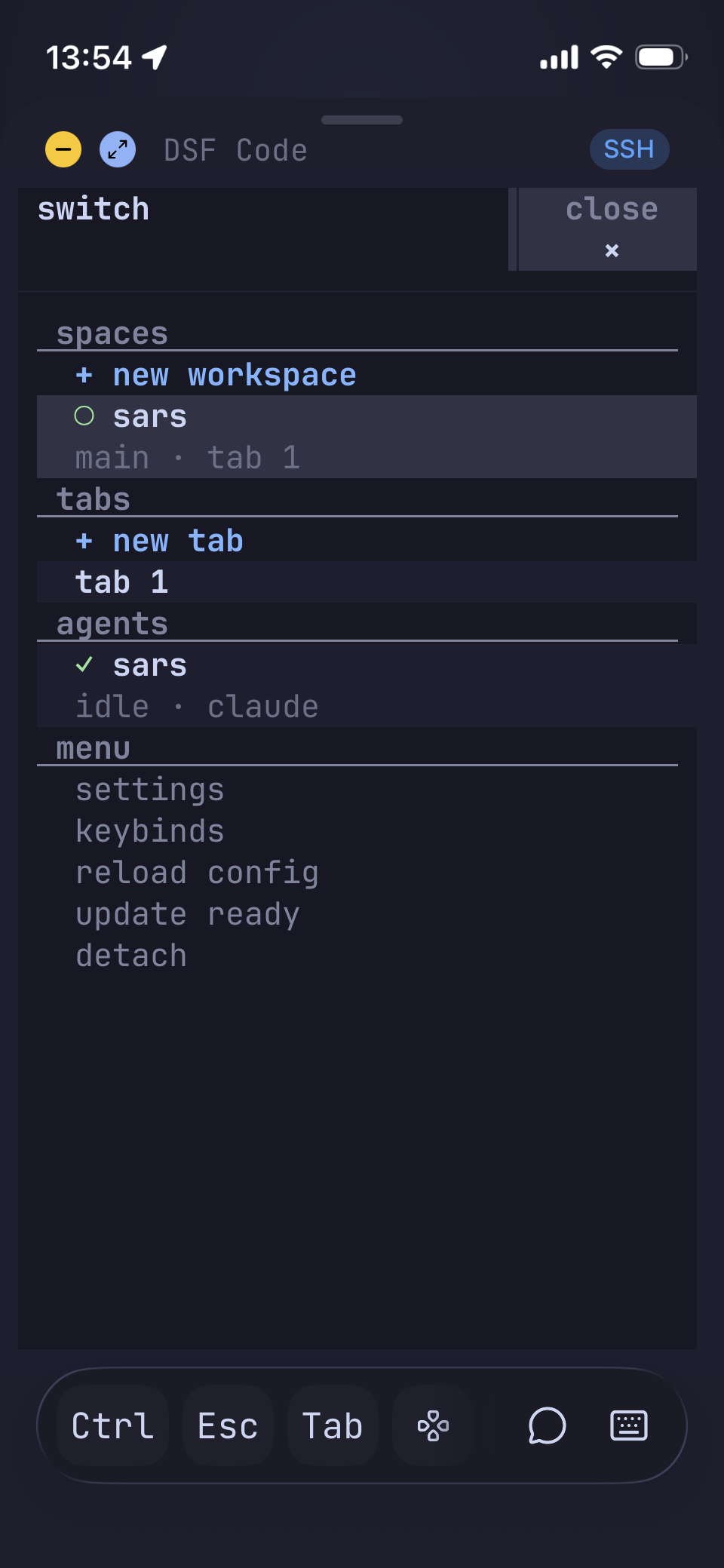
I don’t even need the laptop for the small stuff anymore. Moshi is a mosh/SSH terminal on my phone that understands coding agents: a hook on the server picks up agent events and pushes them to the phone, so when a Claude is blocked waiting on an approval or a question, I get a notification and can deal with it from wherever I am. Half the time resolving a blocked agent is a one-word answer anyway; that no longer requires walking back to a keyboard. It is a real terminal too, so if a quick answer isn’t enough I can attach to the actual session and sort it out properly.
It also made the GNU Stow setup earn its keep all over again. New server, clone the repo, run the installer, and five minutes later the exact same environment is there, hooks and skills included.
But the Browser Is Still Local
There is one catch with running everything on a server: when a Claude spins up a dev server to verify its work, that server is listening on a port over there, and my browser is over here. I still want to click through the actual UI before I sign off on a change.
SSH port forwarding sorts this out. My ssh config keeps per-host blocks in ~/.ssh/config.d/ (gitignored, since hostnames don’t belong in a public repo), and the dev server’s block carries LocalForward entries for the ports I care about:
Host dev
    HostName my-dev-box
    LocalForward 5173 localhost:5173
    LocalForward 5000 localhost:5000
With that in place, localhost:5173 in the browser on my Mac is the Vite dev server running next to the agent that started it. As far as the browser knows, everything is local.
The part that makes this painless is the ControlMaster multiplexing from my ssh config. Every ssh to the same host shares one underlying connection, and the forwards ride along on it, so I’m not keeping a dedicated tunnel terminal open. And when something starts on a port I didn’t plan for, I can bolt a forward onto the already-running connection without reconnecting:
ssh -O forward -L 8080:localhost:8080 dev
No new session, no interrupting anything; the port just shows up locally.
Still the Same Rule
Reading back the February post, the thing I compared Claude to was a junior programmer you need to guide. That framing still fits, there are just more of them now, and I have tooling that tells me when one of them is stuck and shows me exactly what they changed. I will say the juniors are getting noticeably better; with every model release my team of agents gets things right more often, needs less hand-holding, and comes back blocked less. The worktrees keep them out of each other’s way, herdr tells me where to look, and hunk makes sure I actually look.
Because that rule hasn’t changed: I review everything. The tools above exist to make reviewing easy enough that I never get tempted to skip it.
What’s Next
Everything above is one person’s setup. The obvious next step is extending it to a team, and that is what I’m digging into now: sharing these working agreements through repo-level config and plugins instead of personal dotfiles, using boards (Azure DevOps, Jira, GitHub Issues) as the handoff point where a ticket becomes a prompt and a PR comes back, and figuring out what a ticket needs to contain for a machine versus what it needs for a human. Getting visibility right is the interesting problem; my terminal tells me what my agents are doing, but the team needs that story told on the board.
There is a bigger thread behind that too: PRD and BRD thinking, and what shared context looks like for a whole organisation rather than a single repo. If agents do their best work when you hand them the right context, then the documents most companies let rot in a wiki suddenly matter a great deal. I have been chewing on that a lot lately.
That’s a post (or two) of its own once I’ve actually lived with it for a while.